Adding a second sidebar to your Blog - part 2

In one of my older posts, I gave a short tutorial on how to add a second sidebar to your Blog. Recently I got some comments of people who got stuck, so I decided to post a second, more detailed tutorial on how to rig up a second sidebar.

Understanding structure and layout.

First of all, you have to understand that your Blog Layout consists of several sections. The standard Blogger template has a Header-section, a Sidebar-section, a Main-section and a Footer-section. Inside these section Blogger puts the widgets, these are the page-elements that you can select from the Template-tab.

Now, let's take a look at the structure of a standard Blog. If you create a fresh, new Blog, the Page Elements Tab looks like this:
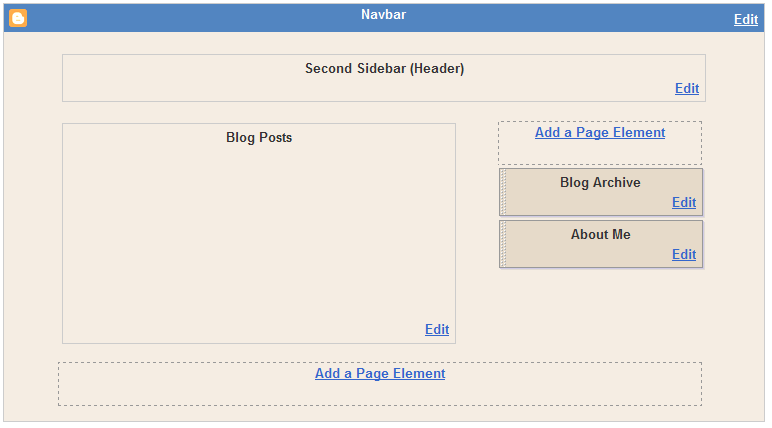

This Layout has 4 sections: Header, Main (with the Blog Posts), Sidebar and Footer.
The HTML-template looks like this (the line-numbers are added for reference only):

010: <body>
020: <div id='outer-wrapper'>l<div id='wrap2'>
030: <!-- skip links for text browsers -->
040: <span id='skiplinks' style='display:none;'>
050: <a href='#main'>skip to main </a>
060: <a href='#sidebar'>skip to sidebar</a>
070: </span>
080: <div id='header-wrapper'>
090: <b:section class='header' id='header' maxwidgets='1' showaddelement='no'>
100: <b:widget id='Header1' locked='true' title='Second Sidebar (Header)' type='Header'/>
110: </b:section>
120: </div>
130: <div id='content-wrapper'>
140: <div id='main-wrapper'>
150: <b:section class='main' id='main' showaddelement='no'>
160: <b:widget id='Blog1' locked='true' title='Blog Posts' type='Blog'/>
170: </b:section>
180: </div>
190: <div id='sidebar-wrapper'>
200: <b:section class='sidebar' id='sidebar' preferred='yes'>
210: <b:widget id='BlogArchive1' locked='false' title='Blog Archive' type='BlogArchive'/>
220: <b:widget id='Profile1' locked='false' title='About Me' type='Profile'/>
230: </b:section>
240: </div>
250: <!-- spacer for skins that want sidebar and main to be the same height-->
260: <div class='clear'> </div>
270: </div> <!-- end content-wrapper -->
280: <div id='footer-wrapper'>
290: <b:section class='footer' id='footer'/>
300: </div>
310: </div></div> <!-- end outer-wrapper -->
320: </body>


Lines 010 and 320 are the body-tags. All your code has to be between these two tags.

Lines 020 and 310 are the div-tags for two wrappers, the wrapper called "outer-wrapper" and the wrapper called "wrap2". In CSS you can define fonts, colors, and other styling for these wrappers. We'll look into CSS later in this tutorial.

Lines 080 to 120 contain the header. As you see, there is a div-wrapper (080 and 120), section-tags (090 and 110) and the widget that contains the header itself (100).

Lines 130 to 270 contain the content. Content means here: blog posts and sidebar. There is a div-wrapper called "content-wrapper" (130 and 270), and inside this wrapper there are 2 more wrappers: the "main-wrapper" (140-180) and the "sidebar-wrapper" (190-240).

Inside the main-wrapper we find the main-section (150 and 170) with the Blog-widget (160). This widget contains your posts.

Inside the sidebar-wrapper we find the sidebar-section (200 and 230) with an Archive-widget (210) and a Profile-widget (220).

And finally we have a Footer (280-300).

Now that we understand the structure, let's take a look at the formatting of this template. In the stylesheet you will fund the following code:

#outer-wrapper {
width: 660px;
padding: 10px;
....... }

#main-wrapper {
width: 410px;
float: left;
....... }

#sidebar-wrapper {
width: 220px;
float: right;
........ }


The outer-wrapper has a width of 660 pixels. The padding is set to 10 pixels, so that everything that is inside the outer-wrapper stays 10 pixels from the border. So that leaves 660 - 20 = 640 pixels for main-wrapper and sidebar-wrapper.
The main-wrapper has a width of 410 pixels, and floats to the left.
The sidebar-wrapper had a width of 220 pixels, and floats to the right. Together, main-wrapper and sidebar-wrapper have a width of 410 + 220 = 630 pixels. In the middle there is a space of 640 - 630 = 10 pixels.
So, if we want to squeeze in a second sidebar, we have to do something to create space. As it is now, it won't fit in.


Adding a second sidebar.

First, we will add the sidebar to the structure of the template, then we will add it to the CSS, and make it fit into the page.

Step 1: Backup the template.

Step 2: Make your right-sidebar unique.
Change lines 190 and 200:
190: <div id='right-sidebar-wrapper'>
200: <b:section class='sidebar' id='right-sidebar' preferred='yes'>

In your CSS style-sheet, change "#sidebar-wrapper" to "#right-sidebar-wrapper".
If you save your template now and view your blog, it should look okay.

Step 3: Add a left sidebar by adding new lines of code:
131: <div id='left-sidebar-wrapper'>
132: <b:section class='sidebar' id='left-sidebar' preferred='yes'/>
133: </div>
Now save your template, and take a look at the Page Elements tab.
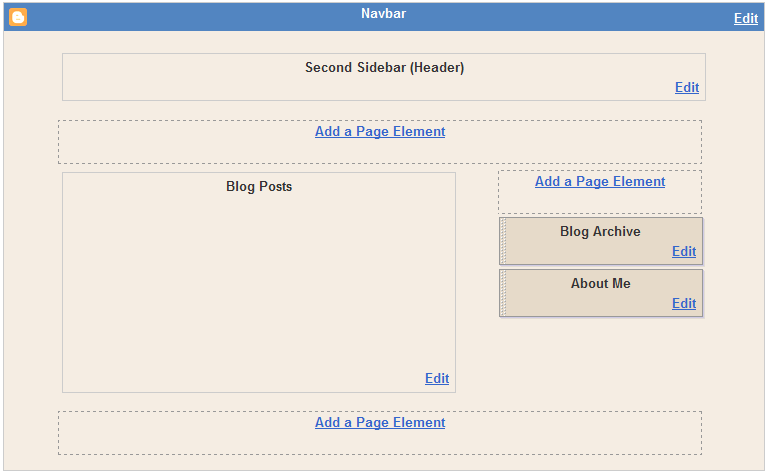
You can see there is a new section, just below the header and above the posts. But it is not at the left side of the screen jet. Therefore, we have to add some CSS.

Step 4: Add CSS for the left sidebar.
In your CSS-style sheet, add the following code:
#left-sidebar-wrapper {
width: 220px;
float: left;
word-wrap: break-word;
overflow: hidden;
}
Your Page Layout tab will show something like this:
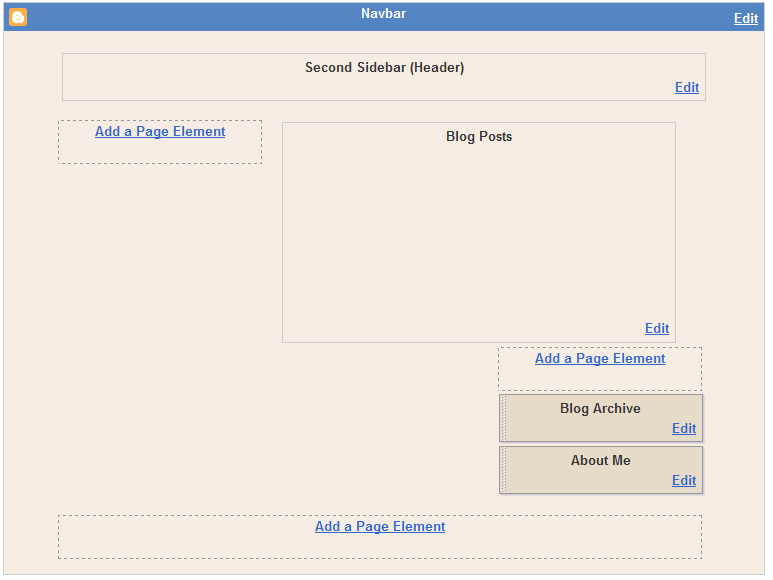
The sidebar-section is now to the left, but your right-sidebar is suddenly below your posts. That is because the width of 2 sidebars and a main-section counts up to 840 pixels, and that is more than the width of the outer-wrapper (660 pixels).

Step 5. Change outer-wrapper and header-wrapper width.
In your CSS-stylesheet look for the #header-wrapper and #outer-wrapper definitions, and change the width from 660 to 860.

Step 6. Add a page element.
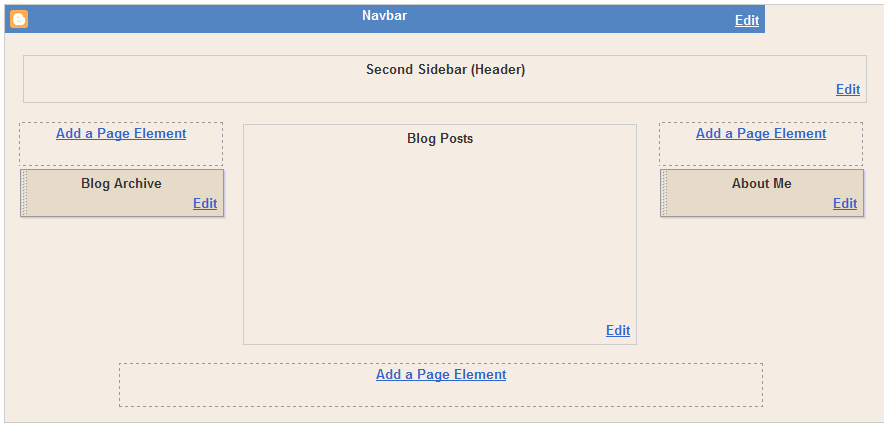
Now finally, add a page element to your left sidebar.
Your Blog Layout will look like this now:


This is what people say:

«Oldest   ‹Older   1 – 200 of 274   Newer›   Newest»
Anonymous said...

Good Dedication!!! =)
Thz 'U' much!

Regards,
someone

Archit said...

Hi Hans!

Nice explanation...

can you please visit http://archit36.googlepages.com/3columntemplate to see my problem...

ohdave said...

I am having trouble with this...

Whenever I view page elements my right sidebar is below and is the full width of the page, even though it is marked at 240 px.

Why is this happening? I've gone over this again and again and I can't figure out what I'm doint wrong.

Hans said...

@archit: as I explained before: please do your own work. I will not convert your blog template for you. But I will be glad to give advice, if you can point out where your problem is, and where you get stuck.

@ohdave: check the width of your left sidebar-wrapper and your main-wrapper. The 2 sidebars, the main, and the margins around them should stay withing the width of the outer wrapper or content-wrapper.
Also check the float of the sidebars and the main. If there is no float on the main-wrapper, the right sidebar will stay below the posts. Hope this helps. If not, please create a testblog, add the sidebars as far as you can get, and post a link here so that I can take a look.

Ebooks download blog said...

good !I need it very much.

ugyen said...

Thanks a lot..hans... really fantastic.... got my blog as well... http://www.ugyendorji.blogspot.com

reagrds
ugyen

ohdave said...

Hans, thanks for replying but the problem is that my right sidebar not only appears below the main on my page elements page but it appears the full width of the page even though I have width set at 220. The page elements which should be the right sidebar appear as the same width as the header and footer. I have tried changing the float but it doesn't help.

Cyber-Buff said...
This comment has been removed by the author.
Hans said...

@Ohdave: Ik looked into your blogs. Ohdave2 seems okay to me with 2 sidebars.
Into My Own has the Labels widget in the footer, and not in the sidebar, thats why its so wide.

Julia said...

Dear BB - I have followed your instructions for creating a 2nd sidebar. After hours of staring at the code, I cannot figure out (1) how to make my header span across the full width of the page and (2) why my two sidebars are pushed below the main wrapper. I tried to move my header widget into a head-wrapper div id, but I have been unsuccessful. Do you have any advice?

Hans said...

@Julia:in the structure of your blog, you have a content-wrapper; inside this content-wrapper there is a main-wrapper, followed by a rightsidebar-wrapper and a lefsidebar-wrapper. So, your blog first displays everything that is inside the mainwrapper, and below it the other stuff is displayed. That is why your header and posts are above the sidebars, and also why your header is not spanning the entire width of your blog.

You have to change it as follows:
outerwrapper [ headerwrapper ; contentwrapper [leftsidebar wrapper; main wrapper; rightsidebar wrapper];footer-wrapper]. Here I used brackets to indicate which wrapper should include others.

Viscera Trocar said...

I tried to use this edit, but it didn't turn out anything like the demo. Parts of the template were rearranged, but I couldn't get it to display three columns. Is it something I did wrong, or is it the template I'm trying to modify?

systrarna said...

I have a 3 columns layout now but not like I wanted. I wanted a layout like yours. Pls have a look at systrarna.blogspot.com

Hans said...

@Viscera: If you could tell me more about the problems you had I could try to help you out. What went wrong?

Hans said...

@systrarna: if you like a template like mine, you could start with the standard Denim-layout, and then add a second sidebar. That's how I did it.

protesto said...

Hi Hans,

I'm using a different template which has different codes. I want to move my left side bar to right. I couldn't find the right parameters which I should change. Here is css code:

#content-wrapper {
padding: 0 1em 0 1em;
}

@media all {
div#main {
float:right;
width:75%;
padding:30px 0 10px 1em;
border-left:dotted 1px $bordercolor;
word-wrap: break-word; /* fix for long text breaking sidebar float in IE */
overflow: hidden; /* fix for long non-text content breaking IE sidebar float */
}
div#sidebar {
margin:20px 0px 0px 0;
padding:0px;
text-align:left;
float: left;
width: 22%;
word-wrap: break-word; /* fix for long text breaking sidebar float in IE */
overflow: hidden; /* fix for long non-text content breaking IE sidebar float */
}
}

protesto said...

and this below:

@media handheld {
div#main {
float:none;
width:90%;
}

div#sidebar {
padding:30px 7% 10px 3%;
}
}

Hans said...

@protesto: change float:right to float:left and change float:left to float:right.

Skanky Jane said...

Dear Hans,

I have a 3 col Minima template from Ramani at Hackoshere.

I would like to have the main content section (or middle column) a different colour to the two (left & right)outside columns.

What I would prefer to do I think is to add an image for these sections (like I did on the old blogger service). On the old blogger service I could have a different image for background, left sidebar and main column.

I am wondering how I would go about adding those type of images to my current template (if it is at all possible). I wonder where I would add the image url in my template code?

Thanks for your time. I like your blog a lot - especially the tutorials.

SJ xx
http://skankyjane.blogspot.com

Hans said...

flkeeph@Skanky Jane: You need to set the backgrounds of your main-wrapper and your sidebar-wrapper. The main-wrapper contains all your posts, the sidebar-wrapper contains your sidebar-widgets. Find the main-wrapper id in the CSS-part of your template (that's the top part, between <style> and </style>), and add the following code: background-image: url(yourpicturesurl);. This way you can add an image to the background. You can also set background-repeat to repeat-x, repeat-y or norepeat. For a non-scrolling background set background-attachment to fixed.
If the background doesn't shine through the posts or sidebar-widgets, you have to set their background-color to transparent.

Skanky Jane said...

WOW Hans, thank you so much for this! This is really helpful! I very much appreciate your time in answering my question.

(Just wondering what flkeeph means now!)

SJ xx

PS If I add your button to my blog I am not sure how to get it to work as a link with cursor over (newbie!) I can just add a regular link.

elleabelle said...

Hello Hans.
I am sorry to be an idiot, but I am trying to follow your instructions and I am getting stuck on the Css-style sheet? What is this? Where do I make those changes?? I really appreciate your help!

elleabelle said...

Oops. Sorry. My blog is www.bloominglily.blogspot.com.

Hans said...

@Skanky Jane: if you want to use the button as a link to my blog, add the following html: <a href="www.beautifulbeta.blogspot.com"><img src="YOURPATH/beautiful-beta.png" alt="button" title="Visit Beautiful Beta"/></a>
Replace YOURPATH with the path to the button-image.
As you see, it is just an ordinary hyperlink, but with an image instead of a text.

Hans said...

@elleabelle: CSS means Cascading Style Sheet. Here you find all the settings of fonts, colors and margins of your Blog. The content of your Blog is in the body, between the <body> and </body>-tags. The way your content looks is defined in the style sheet, between the <style> and </style>-tags.
So all the CSS has to be put there, between <style> and </style>
Hope this helps

burekaboy — said...

hans, great site. thank you for all your work.

i am wondering which template you are using for these instructions.

will they work for the rounders 2 template? the information does not match what you are saying, from what i see when i expand the widgets. it is very confusing with the beta version. i imagine there are extra changes for column widths with rounders 2. (not sure).

any help you can give me to create a left column would be appreciated.

Hans said...

@burekaboy: your Rounders-template is a bit different from the Denim-template that I use for my Blog. In my Blog, all sections are square boxes. In Rounders, the boxes look rounded, because there is a little graphics on top of the box, and at the bottom. This graphics is a bar with rounded corners. This trick is done with the use of some extra <div>-elements: sidebartopwrap and sidebarbottomwrap.
If you want a second sidebar in Rounders, it is basically the same as I pointed out in this tutorial. But what you also have to do is to create these extra wraps for the second sidebar. And you have to create new graphics. Rounders has a fixed sidebar-width, and the graphic is exactly the right number of pixels. Having a second sidebar means that both sidebars are a bit thinner, so you have to adjust the graphics to fit the new size. You can do that quite easily in Paint or any other drawing program.

Skanky Jane said...

Thanks for that Hans, another little thing I didn't know. I'll be able to use that for your button and other things now.

Cheers,
SJ xx

burekaboy — said...

hans -- thank you muchly for your very quick reply and the information. i will try to experiment further with my test blog to see if i can figure out how to do it. i tried to leave you a msg on two other occasions but could not get through w/ blogger.

again much appreciated and a great blog for helping others. keep up the excellent work!

Alex Irvine said...

I've been through this three times. The first time I just added the code; then I did it twice following your save-and-view steps. Every time I end up with my posts at the left, the left sidebar in the middle, and the right sidebar on the right. Haven't been able to get the main content into the middle. Help?

irvinestestblog.blogspot.com

Hans said...

@Alex: in your template body (that is between the <body> and the </body>-tags) the order of your section is: main, leftsidebar, rightsidebar. This means that your mainsection with the posts is floating completely to the left, followed by your left sidebar (that is floating to the left and bumps against your posts so that it stays in the middle of the screen), and with your right sidebar completely to the right.
Change the order to left sidebar, main, right sidebar, and it will be okay.

Lonnie G. Hill said...

Hans, I've tried this a few times and I cannot get it to work... each time I edit the sidebar like you said, and only the 1st step of adding the right -sidebar code, which you said should make it look the same still, the middle column gets bigger and overlaps the right bar almost. Getting kinda agrevating... also, that line 01-320 thing you posted is not the same as my template, so I'm definitely having a few issues.

Any advice you could give would be great. Thanks.

Hans said...

@Lonnie: I suggest you set up a testblog and add a sidebar there, and then I can take a look at it why it won't work.

Lonnie G. Hill said...

I created a test blog at javatyger-testblog.blogspot.com and same issue using that same template... maybe that's why... if you go down the list, you'll see that div-id side wrapper thing is not where you stated. I don't get it... the only place that can find it is at the bottom of my template.

Help! :-{

Hans said...

@Lonnie: in your test-blog find the #main-wrapper style definition, and change float:left to float:right. Now find the #sidebar-wrapper and change float:right to float:left. Save the template and watch in awe: your sidebar and posts are swapped.
If you want 2 sidebars, you have to add a sidebar section in the body of the template. The left sidebar section has to be above the main-wrapper, because leftsidebar and mainwrapper both float left. The first one is completely to the left, the mainwrapper is floating left and leans into the left sidebar. Your right sidebar floats right, so will be to the right anyway.
If you want an example, take a look at one of my templates to see how I did it.

L.A said...

Hi i want to add a another side bar buy when u as where find the out wrapper with the padding and the width i only fine these...

----------------------------------------------- */
#outer-wrapper {
margin: 0 auto;
width: 760px;
text-align: left;
font: $bodyFont;
}

#header-wrapper {
padding-bottom: 15px;
background: url(http://www.blogblog.com/thisaway_blue/bg_header_bottom.gif) no-repeat left bottom;
}

#header {
background: #204063 url(http://www.blogblog.com/thisaway_blue/bg_header.gif) repeat-x left bottom;
}

#content-wrapper {
position: relative;
width: 760px;
background: #f7f0e9 url(http://www.blogblog.com/thisaway_blue/bg_main_wrapper.gif) repeat-y left top;

where can i fine the one i need to edit. thank you...

Hans said...

@L.A.: I guess you are looking for the #sidebar-wrapper. You need to make a copy of this one and call it #right-sidebar-wrapper, and set float: right.
In the template you will have to add a section <b:section..../> as described in the tutorial.

Lestat said...

Hey Hans ! My template is called "minima". I have a trouble right from the very beginning as I can't find the line-numbers list from 010 to 320 in the HTML-template. Where do I find this list ??? Thanks. Lestat

RocketRat said...

Lestat, the coding is all the way at the bottom of the Minima HTML. I had problems recognizing it at first because it wasn't straight up and down as in the example he gave, but it's there.

Sir Hans, I have the new sidebar alright, however I want to add padding to separate it a little more from the blog itself. Do I do this to the sidebar wrapper or to the outer wrapper, or wherever else?

Linda said...

"div id='left-sidebar-wrapper'
b:section class='sidebar' id='left-sidebar' preferred='yes'/
/div"

Where should I put this?

Linda said...

I fixed it!

Hans said...

@Rocketrat: if you want the sidebar to be more seperated from the main blog text, you want to adjust the widths and the margins. If you are using a fluid design, margins are in percentage of the screenwidth. If it is fixed, margins and widths are in pixels.
In my own design, a fluid one, I used the content-wrapper. It is set to 96% width, with left and right margin set to auto.
Then I gave the left-sidebar-wrapper a width of 22% and a left margin of 1%, the right-sidebar-wrapper a width of 22% and a right-margin of 1%, and my main-wrapper (that contains the blog-posts) a width of 48% and a left margin of 1%. That leaves 1% margin between main-wrapper and right-sidebar. So the entire width is 2 + 1 + 22 + 1 + 48 + 1 + 22 + 1 + 2 = 100%.
Change the margins if you need to, or change colors, or add borders to give it more distinction.

RocketRat said...

Gracias

Sam Zen said...

Thank you very much, Hans! I like your blog and learned a lot. I switched the template from 2 colums to 3 colums. It took 5 minutes only.

Thanks a lot

Hans said...

@Sam Zen: thank you!

M Greenberg said...

Hans,
I used your instructions for adding a sidebar. The blog page looks ok but the page elements looks wierd. Right sidebar is below Main.
I am using the "minima" template.
Also, I can't find any width setting for my content-wrapper. take a look and thanks for your help.
oakview84.blogspot.com

Hans said...

@Mike: a viewed your blog in IE6 and it displays fine, the right sidebar is where it should be.
If you have problems on other browsers, just change the width of main-wrapper and sidebar-wrapper a bit to make it fit better.

Scully said...

Oh my gosh. I succeeded at last. Mostly thanks to your post, but I had to figure out a LOT of stuff on my own, since I used another template. But I got it to work at last.

http://www.shotmyheart.blogspot.com/

Sam said...

Hans , thanx for sharing this with us.

I have a few questions I'd like to ask.

I think I have succesfully placed everything according to your instructions. However, my left-sidebar is attached to the main post now. There's no space between them at all. The right-sidebar on the other hand, is seperated from the main post( 10 px I think).

How can I seperated the left-sidebar with the same margin as the right one?

I did everything exactly like your intructions.

Hans said...

@Sam: I guess that your right sidebar has in its styling the float:right definition. That is why it is completely at the right. Your left sidebar and your main-wrapper (with your posts in it) are both float:left, and that's why they are to the left side of the screen. If you want some space between them, you need to add a margin to the mainwrapper. In the css-styling, add margin-left:10px; and you will probably have what you want.

Sam said...

@Hans, You are AWESOME !!! The left-sidebar is perfect now. Thank you so much !!

Hans said...

Sam, good to hear you succeeded!

MissWrite said...

Thank you SO much! I just used your forumla to create a left-hand sidebar on one of my blogs and it is fantastic! I can't wait to do my others now.

Ramanathan said...

Hans, Thanks a lot for your help. I made my blog 3 col.

But, One prob. how to eliminate the gap between col 2 and col 3?

Pls help.

Hans said...

@MissWrite: you are welcome!

@Ramanathan: see my answer to Sam's questions. You have to adjust your margins.

Ramanathan said...

Oh!! Thanks a lot hans. I misunderstood the parameter float. I thought 'right' means right to the middle col. sorry.

Thanks again. it works fine.

KauhuKarhu said...

hi hans,

thanks a lot for your effort. tried it on my (still rudimental) blog and it more or less worked.
still got some problems to fix, but i got the hang of it, and its a lot of fun playing around :-)

greets from switzerland

Hans said...

@Ramanathan: glad you solved it!
@KauhaKarhu: most of the work will be in fixing the CSS so that everything looks nice. Glad to meet you here!

A L R said...

Thanks Hans

Perfectly explained directions! I was able to complete these changes in less than five minutes!

~Ri

Hans said...

@ALR: thanks!

blackonion said...

Hello Hans,

I have followed your explanations and now I have two sidebars.

But at the Page "Elements TAb" my rigth sidebar is always under the posts.

I have changed "outer-wrap" to 980, but I can not find any px for the header definition.

This is my test blog: http://bogdeprueva.blogspot.com/

Thanks a lot.

Blackonion said...

Hi again,
This is the original blog I want to replicate: http://www.blackonion.blogspot.com/

George Orwell said...

Protesto made one 3 column rounders template- This might be usefull to you
3-column-rounders-template

Blackonion said...

Thanks George Orwell.
Protesto's template was too much complicated for me, but from his blog I found a 3 column rounders template without any additional hack at http://www.blogcrowds.com

As soon as I could put the comments from Haloscan I would migrate to beta.

Thanks a lot for your help!!

And thanks also to you, Hans. I almost understood your html advices, but rounders is too much complicated for me to modify.

Have a happy new year.

George Orwell said...

Chack this post Testing haloscan comment hack for blogger beta

Hans said...

Okay guys, good to see you solved it!

aroengbinang said...

Hi Hans,

It's really fantastic. Thank you so much!!!

I use 890 for #header-wrapper and #outer-wrapper definitions, and plus your suggestion to add margin-left:10px on the mainwrapper, it looks perfect!

Appreciate if you can take a look at http://aroengbinang.blogspot.com
I love it very much!

Cheers,

Sarah said...

Hans, This is awesome! I am having one problem... my page looks fabulous, but in the page elements tab, I have to scroll sideways to get to the right sidebar. Of course, this isn't a big deal and it works fine.. is that how it's supposed to be or can I fix it?

If you need to see my blog, I can send it to you, but I really don't want to put it out here for everyone to see.

Yannis said...

man, i ever answer free information but you saved me..great job and very explanatory...it would have taken years to do otherwise...thanks a lot

nick said...

how is this done using the classic html editor?

KimbaLee said...

Thank you so much for this, I have a few questions. I've added a flickr badge, but can't get it to center without centering the entire body (post, sidebar etc). Also, my right sidebar is closer to the body of my post (this is the one I added). I can't figure out how to center the body and sidebars so that it looks neat. Any help? www.kimbanelson.blogspot.com if you want to view it. Thanks!

Hans said...

@aroengbinang: congratulations!

@Sarah: adding a second sidebar can mess up the layout editor, as it uses the same css-styles. Take a look at this post to learn how you can solve that problem.

@yannis: thanks!

@nick: when you are using a classic template the best advise is: switch! But if you don't want to: edit your template, and look for a div-section that contains the sidebar. Find the opening <div>-tag and the closing </div>-tag of the sidebar, copy the entire sidebar, paste it at the place where you want the second sidebar to be, change its ID, and add CSS for this ID to your template. Some knowledge of html and css required.

@kimbalee: the flickr-badge is a piece of html-code. Create a html page element, paste the code into it, and put a <center>-tag in front of it and </center> behind it. Then save the page element. That should do the trick.

KimbaLee said...

Thanks so much Hans! My Flickr badge is centered perfectly! I had forgotten to follow up on the end with a center as well.

Is there any way to fix the spacing between the body and two sidebars? My body seems to be off centered, or the right sidebar is closer to the body.

Hans said...

@Kimbalee: your template uses html-wrappers that are placeholders for your posts (the main-wrapper) and your sidebars (the sidebar-wrappers), and it is all wrapped up in an outer-wrapper. The width of the outer wrapper is set to 860 px. Your main wrapper is 500 px, each sidebar is 150 px, so that leaves 860 - (500 + 150 + 150) = 60 pixels for white space between the sidebars and the main wrapper.
Now your left sidebar is floating to the left, and your right sidebar is floating to the right, and you main section is also floating right, and that's why it is off-centered, as there is no white space between the main and the right sidebar. All your 60 px are on the left side.
So much for the explanation, now fast-forward to the solution. In the skin of your template, look for #main-wrapper. Below this line you have to add: margin-right: 30px; and your template will be well centered.

OrangoStango said...

dear Hans, I added the second sidebar and it seems all things are working well under IE. on the other hand, I have a different behaviour under Mozilla. in fact it places the central part under the two sidebars. and I don't think is a matter of width. what I noticed is that if I put the float:left in the main section all works well under IE, while if I cut off that line all works well under Mozilla, but I have a really strange behaviour under IE: you know the main section contains the losts list, well in this situation under IE only the first post works well, while the other ones are put under the two sidebars... do you have any suggestion for me? the url where I am doing these tests is http://easyusability.blogspot.com/. thx in advance.

KimbaLee said...

Hans you are amazing!!!! THANK YOU SO MUCH!!!!!!!!!!!!!! Fabulous. Thanks SO much for your time!!

OrangoStango said...

now it works well... I don't know exactly what I did but now it is OK. tank you anyway ;)

joiceylicious ü said...

hey! wow thank you your info was more than helpful! i was actually able to add a left side bar on my minima template... cool!!! thanks again. check it! bunsochuchu.blogspot.com

Terry said...

Thank you for all your help, this was the only site I've been able to find that gives you a way to add a third toolbar that actually WORKS!

I was just wondering though, if I change the "padding" in the part of my page code that is:

/* Sidebar Content
----------------------------------------------- */
.sidebar h2 {
margin: 1.6em 0 .5em;
padding: 4px 5px;
background-color: $sidebarTitleBgColor;
font-size: 100%;
color: $sidebarTitleTextColor;
}


Will it change the padding for both sidebars??? Or do I need to somehow add another one for the sidebar I added myself...

Terry said...

Oh and one more question...

I just noticed that when I go to one of my post pages (not viewing the blog home page), it changes the blog title in the header to the color blue (the color I have selected for my links), instead of black like it's supposed to be (black). How do I fix that?

Thanks again!

If you need to see what I am talking about here's a link: www.caniacnation.blogspot.com

Fizzy said...

Hello, I found your link on another blog and would like to thank you so much for providing such a clear set of instructions. It took me a little while but I am dead proud to have done it. Thanks for the help and support provided on your blog

Hans said...

@OrangoStango: glad it is solved. Your Blog looks great in my IE.

@Kimbalee, Joicylicious: you are welcome!

Hans said...

@Terry: if you change the padding for .sidebar, then you are changing all elements that have a class="sidebar". So if both your sidebars are of the class "sidebar", both will change. Be aware that a class is not the same as an id. Only 1 element on your page can have a certain id, while many elements can have a class.

Hans said...

@Fizzy: you are welcome!

liz said...

Hans,

you are the man! this is great... i've been wanting three columns for ages and your explanation worked great, thank you so much. i'm sorry that i do have one small problem and was wondering if you could help me.

my right sidebar background shifts left about 5 inches down the page... i've tried everything i could think of... any idea why this might happen? you can see it at http://documentarist.blogspot.com

thanks a bunch!

jaime said...

Hi Hans,

Thank you for this wonderful tutorial, I had searched for hours for info on 3 column templates with no luck.

I am not an expert with html and am having trouble with a few little things on my blog still.

1) I have three columns now, but the 'page elements' for my right hand sidebar shows up at the bottom of the page (for now I put everything on the left sidebar). I have stared at the html but cannot figure out why - any ideas?

2) I replaced the standard title header with a graphic. Originally, blogger required me to still typr something in the title field, which looked horrible with the graphic. I ended up deleting the header widget from my code, which worked, but now the title of my blog just shows up as "." in any window. Is there a place I can add the title of my blog so it is labeled properly without it actually showing up at the top of my page?

Thanks again for all your advice, it has saved me hours of frustration.
http://designklub.blogspot.com

-Jaime

Christine said...

I customized and added another sidebar. I want my sidebars to be the same height as the main. Please advise how to achieve this.
Thanks,

Christine said...

I should've added...I went from classic to new template, added the second sidebar, dressed it up ok (although I can't place the adsense where it used to be)...
www.randomchilee.blogspot.com
The reader scrolls down the page and suddenly, the sidebars just end!

Hans said...

@liz: in my browser (IE7) your page renders okay. The right sidebar background is where it should be. Might dpend on the browser?

Hans said...

@jaime: if your right sidebar is below the rest of your blog, it means that the width of all your columns is more than the width of the outermost container of your blog template. So make the width of the sidebar or other page elements a little bit smaller, and it will fit.

It is not a good idea to delete your title widget. In your styling, define a class called .hidden, and define it as display:none; Give the header-title (probably #header h1) a class="hidden". In this way, it will not mess up your graphic title, and on the other hand, disabled users or users using very old browsers, who are more interested in text than in pictures, can still read the title of your blog.

Rosie said...

My changes are not live but when I made the edits, I got the 3 columns but the left sidebar was to the right of the main wrapper. It's almost as if the main section is being favored. I would like the sidebars on either side of the main content... Any suggestions? Here is the code:


#main {
width: 425px;
float: left;
word-wrap: break-word; /* fix for long text breaking sidebar float in IE */
overflow: hidden; /* fix for long non-text content breaking IE sidebar float */
}

#right-sidebar {
width: 225px;
float: right;
color: $sidebarTextColor;
word-wrap: break-word; /* fix for long text breaking sidebar float in IE */
overflow: hidden; /* fix for long non-text content breaking IE sidebar float */
}

#left-sidebar-wrapper {
width: 225px;
float: left;
word-wrap: break-word;
overflow: hidden;
}


I've also placed the div tags for the left sidebar before the main wrapper div tags... but that didn't help either.

Hans said...

@Rosie: If the main-wrapper is completely to the left, it means that the order of the divs is not okay, or that the float is wrong. It should be:
- leftsidebar, floating left
- main, floating left
- rightsidebar, floating right
If you keep trouble, create a testblog, try it there, so that I can take a look if the problem persist.

craigsanatomy said...

Hi there,
really appreciate your tutorial, but I'm not able to get step six to work. I adjusted the #outer-wrapper ok, but the #header wrapper had 3 different lines for width, and none of them were "660px;" So I do have the 3rd column on the left side, but the right one is now not lining up at the top.

Here is what I mean, can you help?
/* Header
----------------------------------------------- */
#header-wrapper {
background: #fff;
padding-bottom: 4px;
}

#header .titlewrapper {
background:#269 url("http://www.blogblog.com/no897/topleft.gif") no-repeat left bottom;
padding:0 0 0 160px;
margin:0 0 10px;
color:#fff;
width:100%;
width/* */:/**/auto;
width:auto;
}

Calavera said...

Hey Hans, sorry for being a pain and adding my comment to an already long list, but I seem to be having trouble with this, too. Steps 1, 2 and 3 I can do ok.

Once I add the CSS for the second sidebar, however, it doesn't go to the left! Instead, it remains above the normal widgets on the right! Any idea what's up with that?

Hans said...

@craigsanatomy: the trouble with templates is that they are all different. So you will have to experiment with the settings to make it all work. The trick is that the left-sidebar, right-sidebar and main-wrapper are inside the content-wrapper, and header-wrapper, content-wrapper and footer-wrapper are inside the outer wrapper. So it all has to fit. Left + main + right = content = outer. In most cases that will do the trick, and the content that is inside the sidebar-widget should not exceed the sidebar-width.

Hans said...

@Calavera: a testblog would be helpful, as I could take a look at it. Your blogs don't show the second sidebar.

Calavera said...

Wow, thanks for getting back to me!

I created a new blog called Testblog, and as you can see, I have followed all of the steps and the only evident changes on it is the expansion of the outer wrapper and header.

There appears to be no second sidebar.

Actually, there is a second sidebar, but it's not on the left! It's on the right and it's above the normal sidebar!

Any idea what's going wrong?

jaime said...

Hi Hans,

Thank you for your excellent suggestions. I'm pretty sure I have all the bugs worked out now and have re-inserted my title widget:) You should get some sort of 'good blogger' award for being so helpful!

Rachel Michaela aka Stylebites said...

Hans, you rock my world with all this advice!

Between this page and looking at the source code of several blogs mentioned here I've been able to add code to color my main column and both side bars. Maybe you could give an explaination of that to the others here?

You wrote how to put a picture behind but not how to color the columns.

Maybe you should write a feature post about it because it took me a long time to Google the right info to do it!

All the best,
Rachel

quiproquo said...

Hi Hans!
I'm sorry to make this queue 1 comment longer.. but:
I can't get how to modify the width of the two components! I'm using th rounders template that looks like this:

#outer-wrapper {
font: $bodyFont;
}

#header-wrapper {
margin:0;
padding: 0;
background-color: $headerCornersColor;
text-align: left;
}


Thanks for being this useful! And compliments for your blog

Meeta said...

Hi Hans! I would really like to add another sidebar to my blog too however I am already stumbling right at the beginning of your instructions. According to your instructions the templates need to have a content wrapper. Mine does not seem to
It starts with the outer wrapper, header wrapper, main-wrap1 and main-wrap2, sidebar wrap -which is not unique as mentioned in line 190 - 200. Where you have line 200 I start with sidebar top and then sidebar bottom. After which comes the footer wrap.

So I am a bit confused on how to go about this.

I was really wondering if you could help me out. I feel kinda silly already stumbling before I even started.

I read in the comments that I need the content wrapper for my page elements section to look like it should. Currently though I have the header, blog post and then below this the sidebar section. I was wondering all the time why this is so.

Hans can you help me?

Hans said...

@Calavera: in the structure of your template (the sections and widgets-part) your left-sidebar has to be inserted above your main-section with the blog posts. The order has to be: left-sidebar, main, right-sidebar. In the styling the float has to be left-left-right (for left sidebar, main and right-sidebar respectively).

Hans said...

@Jaime: thanks!

Hans said...

@Quiproquo: if you are a template that has special graphic elements on the top or below page elements, you might run into problems when changing the width of a sidebar or main section. This is because the graphic element (such as a rounded corner, or a nice border) is a picture-file (gif, png or some other format) with a fixed width. So in that case you have to adapt the graphic elements too, using a drawing program, or Photoshop.

Hans said...

@Meeta: well, all templates have their differences. Fact is, that the Blogger widgets provide for all the wrappers I mentioned. But it is the choice of the template designer for which id's or classes (these are the html/css technical terms) he or she adds styling to stylesheet (the skin of your blog). So apparently, yours has no content-wrapper. What to do? The purpose of this tutorial is to make you understand how the stuff works, so that yuo can overcome such difficulties as you have encountered now.
So first, add the new sidebar section to your template, but don't bother with the styling. Then add one or two page elements to this new sidebar. View your blog, and in will be there, but probably not on the right place.
Now add the styling, which will probably be the same as the styling of your other sidebar.
If you have no content-wrapper, set the widths of your sidebars and your main so that sidebar+sidebar+ main = header-wrapper (or less). And see if it fits now.

Meeta said...

Hi Hans! Thanks for that quick reply. Ever since I did write to you I have been playing around and managed to get that second sidebar up. However, I have the left sidebar and the blog post element in the proper place, but my right sidebar is showing up below the blog post element. It's a bit frustrating as I have been playing around with the sizes and widths for hours. I am beginning to think that I should simply start all over again ;-(. I will keep trying and if I don't get any further, I hope you do not mind me coming back to you for more help.

I love this blog and there are so many things I want to try. But it does get frustrating at times. I wish we could swap brains for just a day LOL!

Dekionplexis said...

You sir, are a genius and a gentlemen. This is one THE most helpful sites I've ever read. With your help I've managed to add a second sidebar. Thank you very much.

Dek

Shrish said...

Hi Hans, I followed the above steps exactly. Before the last step (Changing widths) everything was going fine, but after that I cann't get it work properly, page elements are not aligned correctly.

My test blog is here, template is uploaded here, and two schreenshots are 1st & 2nd.

Calavera said...

I get it now! Thanks, Hans!!bap

Yehuda said...

I just figured out how to do all this by myself and then said to myself "this would make a nice post. I wonder if anyone else has posted about it."

And here you already did it.

Yehuda

Lovely said...

Hello,
I already have 3 column template on my blog (http://visitformoney.blogspot.com) now how do i add second header bar on my page ? Do u have readymade 3 column template with second header bar ? If yes then plz provide the download link
My Blog is http://visitformoney.blogspot.com
http://healthtreatments.blogspot.com

Anonymous said...

Thank you..
Very helpful..

Keep up the good work

Cheers,
V

Premiership goals and streams said...

HEy, why my main-wraper is not floating to the centre when there is a space.

A have right sideside bar at his place but when in CSS I put left sidebar floating left and change that main floats centre it wont happen.Main wraper stay at left and left sidebar aslo left but bellow main wrapper?
Help!

dafool.com said...

Worked like a charm. Thank you very much. You are a great resource Hans.
Dafool.com - Everything Foolish Blog

Sheta said...

Thanks for the help. I just added a third column to my blog, and it worked perfectly. Excellent, easy-to-understand instructions. Keep up the good work!

Anonymous said...

thanks!

Martine said...

Hey Hans,

Great that you put the tutorial there, it hs been very helpful. But I have encountered some problems.

My main question is how do I fix the rounded corners bit. I tried to add a third column to my 565 blog, but I just cannot get it right. So I read that you suggested to "make a corner" in photoshop and host it. But how do I do that? not the photoshop bit, but the rest.

Sanne said...

Thanks a lot!

I have test it and it is wonderfull.

But please!!! translate this text into german language. The google-translator is "urgs".

Greetings

Sanne/Germany

Palmetto Equipment And Supply said...

This tutorial was very helpful and we thank you....Palmetto Equipment and Supply

Martine said...

Hey Hans,

Could you take a look at my weblog?(www.sweetsillysilly.blogspot.com) I have changed everything to my liking, with help from blogcrowds, but the only thing I am not happy with it that my sidebars don´t go all the way down.

This used to be the case in the old blogger, but whatever I try I cannot get it like that in the new template.

If you could tell me how to fix this I would be very very thankful.

Martine

Lindsay Erika said...

Thank You! I had been looking all night for this info! I know squat about HTML, but I was able to follow your directions (though I did have to replace left with right, as my template already had a left side). I feel so proud of myself thanks to you!
lindsayerika.blogspot.com

Anderson Torres said...

Muito obrigado!!!
Sua Dica era tudo o que eu estava procurando.
Sua dedicação não tem preço.
Abraço.

A-Manual said...

Awesome Brother!

Very good information and well put...

One thing wasnt mentioned...

(add right-sidebar to identify original sidebar...)but that was str8 forward common sense after such a great tutorial.

Checkout the results!
http://messianicuniverse.blogspot.com

The.Digital.Life said...

wow! thats great! i always wanted a three column template but lately i was only seeing ready-to-use ones which seemed to only come in minima. the only problem that i am having is putting my blog posts in the middle (in between the two sidebars). it didnt do it automatically. how do i get it to do that?

Chad Brand said...

Hans,

I'm so close to getting my 3 column template to work. Only problem is I can't get the main blog post section in the middle of the page. Both side bars are on the right and I can't figure it out. Could you take a look, please? I have a feeling I'm just a few keystrokes away...

Thanks,

Chad

tricolumn.blogspot.com

Renee said...

This is great, thanks so much! I was just wondering if you have plans on making one for the new blogger? Because the beta one doesn't seem to be working for me. :(mm

Doble Estandar said...

Wow!
Thank you so much for this, I had some problem with it at the begining but it finally worked =)
Good job and thx for the dedication!

mslatinarenee said...

Hi Hans,
Thanks for this post, its great! My right column is showing up at the bottom. I never saw a new column on the left. Could I send you my CSS code?

dwianakitchen said...

Hi Hans,
Love to read your blog. But I am confused now. I have been spending hours try to follow what you said but it never work. The page alemant alway show up on the bottom. And I everytime I tried to add left sidebar then click on save this message comes up

"The template is invalid. Please make sure it is well-formed and complies to the Blogger Template Language Specifications. "

I wish I could send you html code but writing on this comment box won't let me do it. Would you please to visit my blog. And I will appreciate if you can find what mistakes I made. I want to have template like yours.

regards,
Dwiana

Cindy Pinsonnault said...

Thanks so much for sharing this info. Great idea, well explained - I added the column, tweaked the sizes a bit - it worked perfectly. Kudos.

pebble said...

Hans,

Thank you. I finally found something on making 3 column layout I can understand.

kiraness said...

So easy. So painless. Thanks again!

javier said...

Very good explanation. Thanks.
I've only seen two "litte" problems with it:
1st: You talk about absolute widths and don´t mention the possibility to use relative ones (%), and it's a litle confusing because yor own blog uses these last ones.
2nd: the name change in the original sidebar may need further changes to maintain the edition of fonts and colours. In some templates the reference to sidebar paarmeters is made with an "#sidebar ..." and need to be changed to ".sidebar..." to indicate a class.

duffs said...

i really need some help
whenever i put my main wrapper float to center, my right sidebar will move to the bottom.
i trying to do is, inbetween left sidebar & right sidebar, there is a spacing with the main wrapper, instead of all sticking together.
is there any help regarding this

Tan said...

my blog looks crowded.how can i make it as wide as yours?

http://net-worm-cheese.blogspot.com/

Beta Bloke said...

@Tan: your #header-wrapper and #outer-wrapper have a 860 pix width. You could set that to 900 to make it wider. Then change the #main-wrapper width and make that 40 pix wider too.

@duffs: you have to realize that sidebars and mainwraps (and all other screen elements too) are rectangles. The space between those rectangles is called margin. So what you should do is that left sidebar and main section float left, and the right sidebar should float right. If you do that, the result is probably that the main section seems to be more to the left, and there is a bigger gap between main section and right sidebar. You can solve this in 2 ways: 1)increase the main section width, or 2)increase the left margin of the main section. The code for this is put in the styling definition (in the skin) of the #main-wrapper div. The code for 1) is set with width: nnn px;; the code for 2) is set with margin-left: nn px;. Just try to experiment with the values a bit to see what you get. Sometimes it is good to put a temporary border around the element so that you can better see what's happening; so add border: solid 1px #ff0000; to help you

VeheN said...

Thank you!! for my 3th col. and my new wide screen of course =)

http://makber.blogspot.com

Jack Bravo said...

Awesome tips. It took a little messing around, but you definitely had the best description of how to do things.

I do have a question, if you have the time (though I know you're doing the Wiki thing). How would I add an extra little column to the right side of the white line - just something really thin that I could put adsense into?

Thanks.

Hans said...

@Jack Bravo: that would mean adding a 3rd sidebar, but just a small one, to put the adsense into.
Trick is the same. Give this sidebar its own class (for example class="adsensebar"), then define a .adsensebar class in the template skin, with a small width (e.g. 100px).

Anonymous said...

hi! I wanted to know if I can make two sidebars together? Thanks.

UNIVERSAL PLAYER said...

Hi Hans !

Thnk you so much for this useful information.

You made my year better ;)

Only one problem I need to fix. The test know on my header is not centerd. Would you possible know how to center it ?

my blog www.ribbsaeter.blogspot.com

Thanks once again and hope to hear from you soon.

Patrick

UNIVERSAL PLAYER said...

Hi Hans !

Sorry I wrote wrong in the last comment.

I meant that My text in the header isn't centered.

What shou dI do ?

Thanks in Advance.

Patrick

UNIVERSAL PLAYER said...

Hi Hans !

No worrries.

I got the pronlem sorted out by trying myself forward.

Wanted congrat you to the very informative blog.

I'll defintely come, nack. And if you have any ideas for business together. Let me know ?

Cheers,

UNIVERSAL PLAYER

kakashi said...

hi! I wanted to know if I can make two sidebars together? Thanks.

Bearbear said...

Thanks to you hans....could I translate
your tutor and put in my blog ,and I will put your link as a source offcourse..

QB said...

Thank you Hans! Your step by step instructions allowed me to add my second sidebar even with my very limited knowledge of HTML/CSS.

It still needs a bit of tweaking, but with your help, I actually did it! Yeah me!

http://cubiesconfections.blogspot.com/

Now, I don't suppose you have just as clear instructions on getting those two sidebars next to each other on one side or the other do you? (hint hint)

Mina said...

THANK YOU SO MUCH!

I've been wanting a 2nd sidebar for FOREVER and could never figure out how to do it!

It took some additional "tweaking" after I followed your steps, but I'm more than pleased with the results!

Thanks again!

Sreelu said...

Hans,

Tried to add a 2nd side bar to my test blog, going no where.

please help

http://test3-sreelu.blogspot.com/

I think I did all the steps mentioned but still cannot get it right

Active Fanatic said...

I first tried adding an extra sidebar to Rounders template using your method. But it didnt worked. The sidebar got stuck to the Header without leaving any place in the middle. But when I tried to add it to Denim template it worked like a charm.

THANKS

DC said...

Hans, you're amazing. Thank you. At first, I couldn't get it to work just right, but I kept trying--I wanted to exhaust all efforts before asking you. And now it works! Thank you so much!

crystal said...

stupid question but what is the CSS style sheet??

Razor said...

Thank you Hans! It took me a couple of hours (it would've been 15 minutes had I paid attention to your line numbers) but I got it right.

One note: The final width number for the outer wrapper appears to be wrong in the directions posted ... 410 + 220 + 220 + 20 (padding)=870

Kana said...

I'm not very good at english, but I will try to explain myself =)
I would like to express my gratitude!!
I was having a hard time trying to organize my blog, because it looked a bit saturated. Then, I used your instructions to put a second sidebar and it was so easy!!
Thank you very much!!
I'm so satisfied with my blog thanks to you!

dipps said...

Hi i m here for your help.i m trying to put up a second side bar in my blog.The problem is that even though i have put the secong side bar....the left side bar is above the blog posts area and the blog posts area is above the rightside bar.Means left sidebar,blog posts area and the right sidebar are not at the same height.can u help me solving this problem?

Free Downloads said...

Its great, working perfectly. Most of the people not understand the things Properly even me too earlier i was confused because this coding its not working with all the templates. Please visit my site for more details http://indianworkathome.blogspot.com

Rosa Graham said...

Thanks for the great tutorial. I successfully added a third column - which I put to the tight of the main column. But now all three columns start at different heights -especially the new (middle column) which is very low. How do I correct this?

Rosa Graham said...

Forgot - my blog is findthefunnywire.com

Angela, Lancashire, UK said...

thankyou very very very very much -have been trying for days and days to try and figure out how to add extra content in a sidebar so that there are two colums ....i didn't have time to get into the whole widget thing b sections and includeables ...but now your explanation has not only added an extra sidebar but has showed me with more focus an element in the coding. Thankyou, brilliant.

I was using son of moto, and if you make both sidebars float left then you have the blog posts down the middle ...or slightly to the left depending on how you adjust the padding and page width and two sidebars to the right. Thankyou again. utter blogging genius.

Jendeis said...

I too am using Son of Moto. Having some problems. On the page elements, the left sidebar "Add a page element" has floated right and is now on top of the right sidebar and is taking up half the width of the page.

The posts element is floated to the left.

www.sellcrazysomeplaceelse.blogspot.com

Thanks much!

Chez Asima said...

hi there,
I tried to change the html code to add a right side bar...but no luck!
what can i do??
I'm just learning all this code, I've tried a few different ways but nothing seems to work, it keeps telling me my changes are invalid??!!
Please help. Merci! Merci!

Asima
http://chezasima.blogspot.com

MISTER FUNKTASTIC said...

Hi Hans, I almost got it, But,at the final step my main wrap is under the new 3rd column to the left. How do I move it to the center to have 3 columns?

Skézenté said...

Hans

Thank you VERY VERY MUCH. I spent most of the afternoon making changes on the original template (I didn´t even know what the hell was that "CSS") and now it´s finally ok!! (Well, reasonably ok).
Next step will be doing it wider (now it´s a "compact" version, I´m doing it very carfully).
Best wishes

http://tierradevocesdormidas.blogspot.com/

Vespucio Runners Team said...

Hi hans!...my right side bar is below my post....and all seems allright, I don't get it.
Can I change the outermost container of my blog template? to fit it all??

My blog is
http://vespuciorunnerteam.blogspot.com/
Thanks

Audrey said...

Hi there! Ok i have followed your tutorial and the advice in the columns. I seem to be having a similar problem to many ppl...my sidebars appear under my main bar. I have adjusted the width and fiddled around with it a bit to see if i could maybe get it to all fit in at the top. But no luck. also im using a template from another site. it appears that they started with the minima template in blogger with some color changes. when i created my 3rd column (left sided one) it doesn't have the same properties as the others (background color, being see through and such). do i need more than your basic instruction to fix it? Thanks for your help....i'm new to this so be gentle!

have a look
http://bigdreamicecream.blogspot.com/

Binahel said...

:D here I am! I followed the guides and the comments and I end up with something that looks ok.
but I suspect it's just luck, since I'm sure I made something wrong in the padding values because I couldn't control the position of the footer and the right bar and sometimes the main area gets too much near the right sidebar *_*
I messed up everything for like 2 hours though... now I don't even know what I touched and what not lol ;) thanks for your guide!

mike@$ said...

hi i have a problem you can see here
http://img250.imageshack.us/img250/8194/copyqq5.jpg
what can i do?

Sorry for my bad english but i am from greece!

The Big Picture said...

Hi there. I hope this question makes sense: How can I add another sidebar on the right hand side of my page? I want two of them there instead of one on the left and one on the right. Anytime I do what I think I should, it really messes up my template.

Here's a look at the page (in progress): http://www.bigpictureradio.com/bigpictureblog.html

Any help would be greatly appreciated.

mo said...

Well, I tried & tried to do this with rounders - but the html code was just different enough to confound me.
So I changed the template to "denim" and followed your directions exactly.
The only thing I had to change was the outer wrap to 880 instead of 860, then it worked!
More of a change (changing the template) than I'd anticipated (I just wanted a second sidebar!) but I shall tweak it to suit me.
Thank you for your instructions.

CS said...

Hi Hans,

did the following:
------------------------------
Step 2: Make your right-sidebar unique.
Change lines 190 and 200:
190: [div id='right-sidebar-wrapper']
200: [b:section class='sidebar' id='right-sidebar' preferred='yes']

In your CSS style-sheet, change "#sidebar-wrapper" to "#right-sidebar-wrapper".
If you save your template now and view your blog, it should look okay.
--------------------
got the following mistake:
Mehr als ein Widget mit dieser ID wurde gefunden: HTML4. Widget-IDs müssen eindeutig sein.
translated: More than one widget found with this ID: HTML4. Widget-IDs must be unique.

What now?

thx in advance
Chris

...changed the kind of bracket to be able to blog it.

KingLover said...

hi
i succefully make the two side bar appear on the right hand side and left hand side
check it
http://tech-track.blogspot.com

you have to make the two #sidebar float :left
#main wrapper
float:left

and in the body put ur left side bar div first then the main wrapper div then the right bar div
thats work for me.

leung said...

So many thanks to you mr Hans.
Now i already have three column. :)
Please visit my blog and Thank you very much.

Anonymous said...

on step 4 where do i add the code?

Fashion Express Tips said...

Nice!! This was what im looking for.. luckily i found this! Perfect!. Hey Thanks!!

Annarasa said...

Excellent tutorial. Thanks!!

Shiphire said...

My blog (shiphiredustbin.blogspot.com)
Can't seem to place the side bar to the left, Is there anyway to make the sidebar to the left?

Silent.Laugh said...

i thought you did a great job explaining and everything seemed to be going well. but then i did the final save and when i previewed, it didnt look right =[
please see my blog.
this is what happens when i try to add elements:
http://s183.photobucket.com/albums/x157/blustar1815/?action=view¤t=blogger.jpg

Hans said...

Well, guy, one good intention for the New Year would be to read all tutorials on the blog. How to swap sidebars from left to right is explained elswhere in this blog; just browse the TOC to find the appropriate posts.
Also, adding a sidebar is NOT a standard procedure. The way it works depends on the structure and layout of your blog. Templates are all slightly different. My tutorials tend to convey understanding of how Blogger templates work, and how to modify them. There is, however, not a standard cookbook receipe, you will have to do some research yourself, to understand how stuff works in your blog.

And if you need help, please be as specific as possible in what goes wrong.

@Silent.Laugh: your photobucket account is private, so I cant take a look.

Silent.Laugh said...

i've made it public:
http://s183.photobucket.com/albums/x157/blustar1815/?action=view¤t=blogger.jpg
also, here is the code:
http://shrima.pandey.googlepages.com/bloggertemplatehtml

Anonymous said...

Thank you VERY VERY MUCH.
voici mon site : http://www.voyages-marrakech.com

Jmorgan said...

I tried your method of make two side bars, but both "add your page elements" are on the right side.
I wish it would work for me.
(I tried doing the same thing with one of my other blog, but it didn't work as well)
-james

Jmorgan said...

Here is my website.
Look on the right side and your will see two right-sidebars out of line.

Hans said...

@James: take a look at the page source, and you will understand what has gone wrong. (View your published blog in your browser, right-click and select view source). In your page the order of things is: main-wrapper, left-sidebar-wrapper, right-sidebar-wrapper. Their floats are left, left and right respectively. So what happens is this: first, your main-wrapper is displayed, floating completely to the left; next, the left-sidebar-wrapper is displayed, also floating to the left, sitting just right from the main-wrapper; finally the right-sidebar-wrapper is displayed, floating to the right.
So if you want to have your left sidebar completely to the left, change the order of the template elements to:
1. Left sidebar, floating left
2. Main wrapper, floating left
3. Right sidebar, floating right

Jmorgan said...

Thanks so much for your help!
I got the sidebars to work...
But as you can see I still have some work to do with my layout.
I stumbled and technoratied your blog.

Bogdan Dodan said...

hi man .. can you tell me what is wrong with mine?i do all the job but the gadget is still in the left. www.bogdandodan.blogspot.com

ill put a picture with the template on blog so u can see better what is wrong .. thx

gayngame said...

Thank you! Thank you! Thank You!

hermes13 said...

Thanks your very much for this Hack...

I was wondering? Do you have a hack for putting your list of labels (as in the labels widget) into categories? Maybe by using the First label of a Post as a main category and any additional labels of a post as a subcategory?

Just wondering if this was possible...

Thanks again for the second sidebar hack.

Razik said...

Thanks A lot

why dont u put Google Ads here?!!!

I ve inplemented it on http://eplmatches.blogspot.com

nofrillz said...

hello. i have a problem. My main & right sidebars are stuck together. but there is a big gap between the main & left side bars. what am i doing wrong? ive looked throught it myself but i can't see the problem

Flu-RO said...

hey hans very helpful blog, i just started on my blog so im still new, my problem is that when i go and add the code from step 4 into CSS and save, the page elements stay the same as pictured in step 3

Adam

Hans said...

@nofrillz: I suppose thaleft sidebar is floating left, and that your right sidebar and main are floating right. Carefully look at the width of sidebars, main and content-wrapper. Adjust the margins and/or widths to make it all fit well. Might take some trial and error.

@flu-ro: post a link to your blog so that we can take a look

Y. S. said...

Yahoooo! At last I've got TWO side bars! I was sick and tired of the dumb "tooth-pick" blogger template.

Thanks a lot Hans. Keep the good work coming ;-)

Though I do have a little problem that I would love to solve.

There is not enough space between the Left sidebar and the Content in the middle. I couldn't figure out how to put more space in there!

The Left sidebar looks "squeezed", on the other hand the Right sidebar has more than enough space on both sides. I did my share of experimenting with several (px) in the HTML but they where not successful.

Is there a way to get some balance on the page, or as they say: "Nothing is perfect"?

Once again thanks a lot.

Here's my Blog's URL:
http://prep4md.blogspot.com/

FluRO said...

hey hans this is the link to my blog http://useenitherefirst.blogspot.com/, now ive proceeded to the last step where i have to change the pixels from 660 to 860 and when i done that it got worse and the page elements page looks worse

adam

Anonymous said...

Hi...I want to add a header bar but want to separate it in between like 1 header bar but want to cut it in between so i got 2 page element option in 1 line please help me...

Sayz Lim said...

Hi Hans,

Thank you so much for your explanation... I manage to get it into 3 column, lol... thank you... I'll be sure to put up your link as the recommended blog... thanks again...

Regards,

Sayz
sayzlim.blogspot.com

hendry's blog said...

thank you for your explanation..

Neng Dalil said...

Hi Hans,

I want text wrapping around my profile picture, like Suhanto's blog at http://suhanto.blogspot.com/.

We have the same template, but why it's different with my profile picture. Help me please...

amander said...

Fiiiiinally a sidebar hack that actually works.. There were a few weird steps that weren't defined enough, like where to put the left-sidebar div, but i just played around until i worked. THANKS!

Rachel said...

Hi, nice explanation. I just have a quick question. I tried doing this with my blog; I already have a left sidebar, so I tried adding a right sidebar. It sorta kinda worked -- I got the new sidebar, but it was between the left sidebar and the main content.

I tried playing with different "float" values for main and right-sidebar, and nothing seemed to fix it.

Here is my code for the right sidebar:

#right-sidebar-wrapper {
width: 220px;
float: right;
word-wrap: break-word;
overflow: hidden;
}

Any advice?

Stefan Day said...

hey hans,

so Ive been toying with this in a 'minima' template and I keep ending with a consistant error.

Everything seems to go well till about step 4 - and there everything is still kind of okay - just that(in page elements view) my right side bar modules go to the bottom fully stretched across the viewer, not in a side-bar size.

I continue on with the steps but that problem never rectifies it self, And the "add element" box that has been created as my left sidebar does not open to add anything to it.

The final preview version displays my posts taking the full 860 width with the right side bar elements listing out below - no wrap text.

Ive restored my original code, but saved this bogus code in case you wanted me to restore the errors to look at them.

Rachel said...

Stefan day, make sure you change the name of your sidebar div to whatever you've named it in the CSS. Otherwise, your CSS will never be used. (That might be your problem)

Rachel

«Oldest ‹Older   1 – 200 of 274   Newer› Newest»